Apple AirTag Review for Checked Bags
Who should buy the Apple AirTag (1st Generation) for a checked bag, and who should pick a different tracker.

Buy it for a checked bag if your phone is an iPhone or iPad on the listed models. Skip it if you use Android, because the listing says it is not compatible with Android devices.
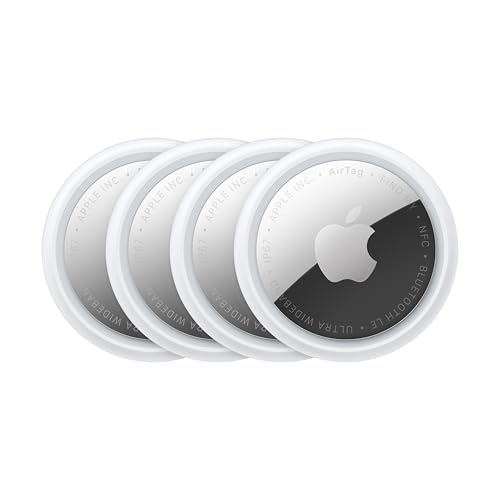
Check price on Amazon ↗Buy the Apple AirTag (1st Generation) for a checked bag if you carry an iPhone or iPad. Skip it on Android. At Trecklist, we build packing lists and review travel gear. The Apple AirTag (1st Generation) is a key finder and locator for a wallet, luggage, a backpack, and more. It connects to an iPhone or iPad through a one-tap setup, and you find items through the Find My app. For a checked bag, the listed features that apply are Precision Finding, Lost Mode, and the Find My network. The listing does not publish the tag's size, weight, or battery life.
Pack Without The Stress
Build a free, personalized packing list for your whole trip, in under 30 seconds. Choose your destination, trip length, and reason for traveling — Trecklist tells you exactly what to bring.
When a checked bag leaves your hands at check-in, you wait for it at baggage claim. A flyer who wants to know where a checked bag is without waiting on the airline is the buyer this tag suits.
The AirTag is not compatible with Android devices, so an Android phone owner should pick a different tracker.
Apple AirTag (1st Generation) at a glance
| Model | Apple AirTag (1st Generation) |
|---|---|
| Setup | One-tap setup that instantly connects the tag with an iPhone or iPad |
| System requirements | iPhone SE, iPhone 6s, or iPod touch (7th generation) with iOS 14.5; or iPad Pro, iPad (5th generation), iPad Air 2, or iPad mini 4 with iPadOS 14.5 |
| Android compatibility | Not compatible with Android devices |
| Precision Finding | Ultra Wideband (UWB) technology on select iPhone models |
| Sharing | Share an AirTag with up to 5 people |
| Privacy | Anonymous, encrypted communication with the Find My network; location data and history are never stored on AirTag |
| Battery life, dimensions, and weight | Not published in the listing |
What the Apple AirTag Is
The Apple AirTag (1st Generation) is a tracker that you use through the Find My app. The listing describes it as a key finder and locator for a wallet, luggage, a backpack, and more. You keep track of those items alongside friends and devices in that app.
Setup is one tap. The listing says the one-tap setup instantly connects the AirTag with an iPhone or iPad, and the product title lists Bluetooth.
You can have the built-in speaker play a sound to help find an item, or ask Siri for help. The listing names both options,
Which Trips the AirTag Suits
A checked bag is one trip type this product fits. When a checked bag leaves your hands, you cannot see where it is. Lost Mode and location sharing are the listed features for that case, and Lost Mode sends an automatic notice when the tag is detected in the Find My network.
The bag stays with you. The sound and Precision Finding still help if you lose track of a bag in a terminal.
Family trips fit the sharing feature. The listing says you can share an AirTag with up to 5 people, so items that everyone uses can be tracked by friends and family. A shared suitcase is one example.
A long-haul trip with connections hands the bag off more times. Each handoff is a point where a bag can go to the wrong place, which is the case Lost Mode is for.
Airline, Sizer, and Security Fit
The listing publishes no dimensions or weight for the AirTag, so it does not say how much space the tag takes inside a bag.
Airline size limits apply to the bag. A tracker kept inside a bag does not add to the outside measurements that a sizer checks.
The listing gives no screening instruction, so nothing in it asks you to take the tag out of the bag.
The listed airline feature is sharing. You can share an AirTag's location with a third party, like an airline, to get help recovering a lost item. The listing does not describe how an airline uses that location.
How to Use the AirTag on a Checked Bag
Set up the tag before the trip, not at the airport. The steps below follow the listed features in the order a trip uses them.
- Set up the tag with an iPhone or iPad on the system requirements list, which needs iOS 14.5 or iPadOS 14.5.
- If the bag is shared, share the AirTag with up to 5 people so friends or family can track it too.
- At baggage claim, use Precision Finding on a select iPhone model. It leads you right to the nearby AirTag.
- If the bag does not arrive, put the AirTag into Lost Mode for an automatic alert when it is detected in the Find My network.
- Share the tag's location with the airline to get help recovering the bag.
- If Precision Finding is not available on your phone, play the sound from the built-in speaker or ask Siri for help.
Who Should Skip the AirTag
Skip it if your phone runs Android. The listing says the AirTag is not compatible with Android devices, and no other step in the listing changes that.
Skip it if your iPhone or iPad is not on the listed models or versions. The listing names iPhone SE, iPhone 6s, and iPod touch (7th generation) with iOS 14.5, and four iPad models with iPadOS 14.5. Devices outside that list are not covered.
Skip it if you need Precision Finding on an iPhone that is not a select model. The listing ties that feature to select iPhone models.
Skip it if you need to share an item with more than 5 people, because the listing says up to 5 people.
Skip it if you want the tag to keep a record of where it has been. The listing says location data and history are never stored on AirTag.
If you need a tracker that works with Android, the Life360 Tile listings in the alternatives list rank #2 in Item Finders on this shelf. If you want the top-ranked Apple option, the Apple AirTag (2nd Generation) 4 Pack ranks #1.
What Would Change the Verdict
The verdict flips to skip if your phone changes to Android. The listing's compatibility line decides that alone.
The verdict also flips to skip if the item must be shared with more people than the listing allows. The listing says up to 5 people.
The verdict changes if the listing starts publishing a dimension figure. That figure would let you answer the sizer question for the tag itself. A battery life figure would matter for a long trip, because the listing does not publish one today.
Our Buy or Skip Call
Buy the Apple AirTag (1st Generation) for checked bags if you carry an iPhone or iPad on the listed models and versions. The listed Lost Mode, Precision Finding, and location sharing features relate to the cases a checked bag creates.
Skip it if you use Android, because the listing says it is not compatible with Android devices.
Start with your phone model. If it matches the system requirements listed above, set up the tag before you pack the bag.
Where to buy the Apple AirTag (1st Generation)
The current price and stock are on Amazon — we don't publish a number here because it changes too often to trust.
Check price on Amazon ↗Alternatives worth comparing
The other best-sellers on the same item finders shelf right now.
Ranks #1 in Item Finders, above this AirTag at #6, and its name lists a 4 Pack.
Read our review →
Ranks #2 in Item Finders, above this AirTag at #6. Pick it over this AirTag if your phone runs Android, since the AirTag listing says it is not compatible with Android devices.
Check price on Amazon ↗
Ranks #2 in Item Finders, above this AirTag at #6, and its name says 1-Pack if you want one tracker.
Check price on Amazon ↗
Ranks #2 in Item Finders, above this AirTag at #6, and its name lists a 2-Pack in black and white.
Check price on Amazon ↗Frequently Asked Questions
Does the Apple AirTag work with Android phones?
No. The listing says the AirTag is not compatible with Android devices. Setup connects the tag with an iPhone or iPad.
Which devices can set up the AirTag?
The listing names iPhone SE, iPhone 6s, and iPod touch (7th generation) with iOS 14.5, and iPad Pro, iPad (5th generation), iPad Air 2, and iPad mini 4 with iPadOS 14.5. Devices outside that list are not covered by the listing.
Can I find a checked bag that is far from me?
Yes, within limits the listing does not publish. The listing says you can find items further away with the help of hundreds of millions of Apple devices in the Find My network. Lost Mode also sends an automatic alert when the tag is detected in that network.
Can the airline see where the bag is?
You can share an AirTag's location with a third party, like an airline, to get help recovering a lost item. The listing does not describe what an airline does with that location.
Does the AirTag store where it has been?
No. The listing says location data and history are never stored on AirTag. It also says communication with the Find My network is anonymous and encrypted.
Does the AirTag fit a carry-on or pass a sizer?
The listing publishes no dimensions or weight, so it does not say how much space the tag takes. Airline size limits apply to the bag, and a tracker kept inside the bag does not change the bag's outside measurements.
Compare & Decide
Use this with your packing list
As an Amazon Associate, Trecklist may earn from qualifying purchases. Every spec above comes from the manufacturer listing; the verdict is ours.